Hello, this is Akira from the Technical Support Team, CX Service Division. Our team specializes in maintenance and operational support.
We support your critical network infrastructure daily through fault analysis, rapid replacement of faulty equipment, and flexible configuration change services during operations.
Importance of Operating System Version Upgrades
In network operations, OS version upgrades are essential tasks.
The latest OS releases are essential for reducing security risks, as they not only add new features but also provide vulnerability corrections. On the other hand, failing to upgrade leaves systems vulnerable to known security flaws, which could have serious consequences.
However, unexpected issues such as device startup failures or application malfunctions may occur due to OS version upgrades. Therefore, maintenance plans that consider pre-testing and rollback time are recommended.
Case Studies
The case we are introducing this time concerns a Cisco Catalyst 2960X switch that entered a reboot loop and failed to boot, despite the OS upgrade being performed correctly according to the proper procedure. Our support desk has received multiple inquiries from customers regarding this issue, and the extent of the impact is significant. Therefore, we would like to provide more detailed information based on insights accumulated in the field.
<The Case>
When performing an OS version upgrade to E11 or later on a Catalyst 2960X switch, the device may enter a reboot loop and fail to start up.
<The Cause>
Issue ID: CSCwo56969
↓Fault Information URL
Source:https://bst.cisco.com/quickview/bug/CSCwo56969
<Occurrence Conditions>
OS upgrade to E11 or later on a 2960X with a serial number starting with FOC24
<Key Points for Identifying This Issue>
The startup log indicates that the MAC address parameter is missing.
“Invalid parameter block — no mac address available.”
“The “MAC_ADDR” environment variable is not set.”
<Recovery Response Procedure>
- Connect the power cable and press and hold the MODE button on the front panel while turning on the power to enter bootloader mode.
※Sending break signals such as Alt+b will not transition to the bootloader. - Enter the following parameters at the “switch:” prompt
switch:set_bs bs: rw
switch:MAC_ADDR=XX:XX:XX:XX:XX:XX ※Input MAC address
switch:MODEL_NUM=【Enter Model Number】 ※Example switch:MODEL_NUM=WS-C2960X-48TS-L
switch:SYSTEM_SERIAL_NUM=FOC24XXXXXX ※Enter the device serial number
switch:set_param -allThe MAC address information for the device can be found in the show version command, the startup log, or on the label near the power supply on the rear panel.
- Start up using the reset command
switch: reset
Are you sure you want to reset the system (y/n)? y
System resetting… - Confirm normal startup
<Current Findings>
Cisco Catalyst 2960X devices with serial numbers starting with FOC24 may be affected by this issue. It has been discovered that if the device’s internal parameters required for startup such as the MAC address are lost and you upgrade to OS version E11 or later, it will cause the device to enter a reboot loop.
The cause of the parameter loss remains unknown at this time, including the possibility of a defective lot, and Cisco has not yet determined when it will be able to disclose the cause. So at present, we are unable to provide an explanation for the cause of the issue.
The solution is to re-enter the missing parameters via the bootloader, enabling the system to boot. Please note that when comparing the parameter display results obtained via the show version command after recovery, with those from a device operating normally, discrepancies will occur. This is because the recovery procedure only applies to the parameters necessary for startup. Even if some elements are not displayed, there are no operational issues.
<Standard>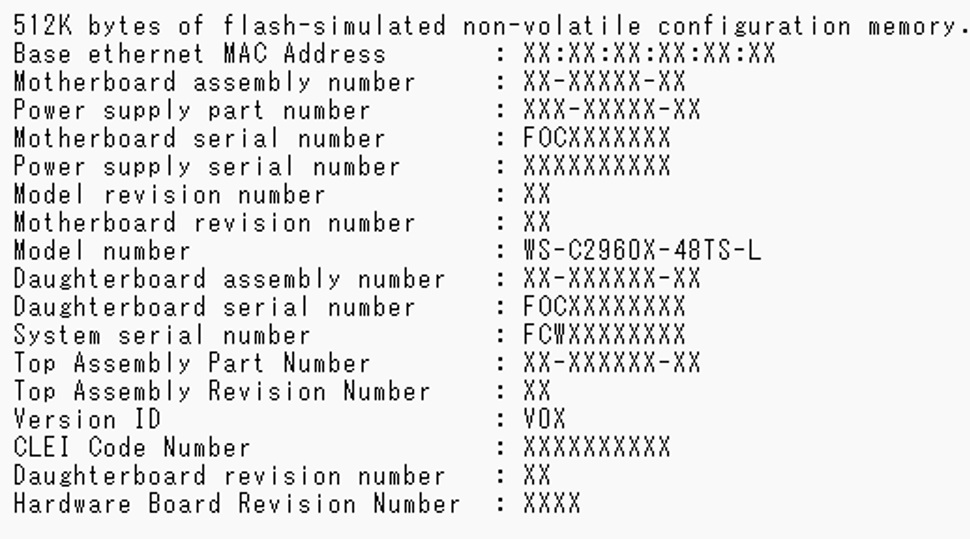
<Recovered Equipment>
Points to Note
If you upgrade the operating system further after recovery, there is a risk that this issue may recur. In that case, you will need to re-enter the parameters from the bootloader.
Also, Cisco has confirmed that this issue affects only the Catalyst 2960X.
Summary
OS version updates are essential for maintaining security, but unexpected issues may occur. Do you have concerns like, “I’m uneasy about handling the work in-house” or “I want to establish a system that can quickly recover in case of trouble”?
At NTT DOCOMO BUSINESS DATA, we provide
- Regular upgrade operation service
- Rapid recovery response during incidents (24/365 on-site support)
- One-stop service from maintenance, operation to construction
If you want to entrust your OS upgrade to a reliable partner, or if you want to leave troubleshooting to a professional, please feel free to contact us! Our service is for those who are already using such services but having trouble, too.
↓↓↓

Thank you very much for reading this article. We are also planning Part 2, “The Maintenance and Operations Support Team.”
We will continue to provide useful information for everyone. Please continue to check our blogs.